Notifications
Arkive sends notifications through Apprise, so a channel can be almost any chat app, push service, e-mail account or webhook.
Add a channel
Go to Settings → Notifications → Add Channel:
- Name: anything that helps you recognise it.
- Type: one of
discord,slack,telegram,email,ntfy,gotify,pushover,webhookoruptimekuma. The type sets the icon in the list. The URL decides where messages go. - URL: an Apprise URL for the service (the field is labelled Webhook URL). See the examples below.
- Events: what this channel should hear about. A new channel starts with every event that means "your backups need attention" selected.
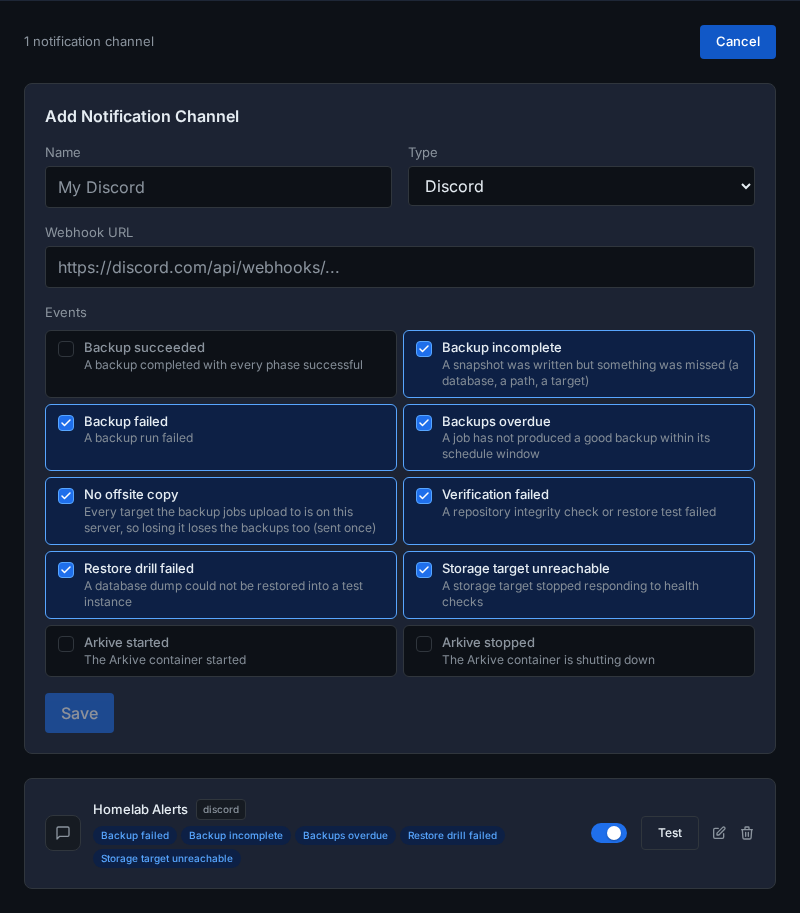
Click Save, then Test on the channel. The test sends "Arkive Test Notification" straight away, bypassing the rate limits below. If it fails, the URL is wrong or the service is unreachable from the container.
An enabled channel completes the Get told when backups fail step of the setup checklist.
Each channel can be paused with its toggle, renamed or re-subscribed with the edit button, and deleted. The web interface can't change a channel's URL after it has been saved: delete the channel and add it again, or send {"url": "..."} to PUT /api/notifications/<channel-id>.
Channel URLs often contain tokens, so Arkive stores them encrypted with /config/.keyfile and shows them masked.
URL examples
The URL is passed to Apprise unchanged. Some common formats (see the Apprise documentation for the full list and options):
| Service | URL |
|---|---|
| Discord | https://discord.com/api/webhooks/<id>/<token> (the webhook URL as Discord shows it), or discord://<id>/<token> |
| Slack | https://hooks.slack.com/services/<A>/<B>/<C>, or slack://<A>/<B>/<C> |
| Telegram | tgram://<bot-token>/<chat-id> |
mailtos://<user>:<password>@<domain> |
|
| ntfy | ntfys://<topic> for ntfy.sh, ntfys://<host>/<topic> for your own server |
| Gotify | gotifys://<host>/<app-token> |
| Pushover | pover://<user-key>@<app-token> |
| Generic webhook | jsons://<host>/<path> (posts JSON) |
Apprise has no Uptime Kuma service. To have Uptime Kuma watch Arkive, use the heartbeat with a Push monitor instead.
Events
| Event | Label in the UI | Sent when | Selected by default |
|---|---|---|---|
backup.success |
Backup succeeded | A backup run completed with every phase successful | no |
backup.partial |
Backup incomplete | A run finished but missed something (a database, a path, a target, unreadable files). Usually a snapshot was still written; when the job had no storage target to upload to, nothing was. The message gives the reason. | yes |
backup.failed |
Backup failed | A run failed: every target it uploaded to failed, or the run stopped with an error (for example too little disk space for the dumps) | yes |
backup.stale |
Backups overdue | The freshness watchdog finds a job without a good backup within its schedule window. Repeated every 24 hours while the job stays overdue. | yes |
backup.no_offsite |
No offsite copy | Every storage target the backup jobs upload to is on this server, so losing the server loses the backups too. Sent once, and again only after the condition has cleared and returned. | yes |
verification.failed |
Verification failed | The weekly verification (Sundays at 06:00) found a target that failed or scored below 50, or the weekly repository check (Sundays at 05:00) hit an error | yes |
drill.failed |
Restore drill failed | A restore drill could not restore a database dump, or the last 3 drills in a row could not test any database | yes |
target.error |
Storage target unreachable | The 5-minute health check finds that a target which was reachable no longer is | yes |
system.startup |
Arkive started | The container started | no |
system.shutdown |
Arkive stopped | The container is shutting down | no |
Through the API, a channel can also subscribe to *, meaning every event, including ones added in later versions.
Repeats, limits and recoveries
To keep a flapping problem from flooding a channel:
- Repeats are grouped. A channel gets the same event about the same job at most once per hour. Events that aren't about a job, such as
target.error, are grouped by event alone. Suppressed repeats are counted, and the next message that goes out ends with "(N more since last alert)". - Each channel gets at most 10 notifications per hour. Further messages in that hour are dropped.
- Successes re-arm alerts. After a successful run, the next failure of that job alerts immediately.
- Recoveries are always delivered. The first
backup.successafter a failed or incomplete run of the same job is titled "RECOVERED: Backup Completed" and skips both limits. Only channels subscribed to Backup succeeded receive it.
These counters live in memory and reset when Arkive restarts.