Restore drills
A dump file that exists isn't proof that it restores. A restore drill does what a real recovery would do: it restores database dumps out of a snapshot with restic and loads them into a database, then checks the result. Drills never touch your live database containers.
Schedule and settings
Drills run once a week by default. Configure them under Settings → General → Restore Drills:
| Setting | Default | Range |
|---|---|---|
| Scheduled drills | enabled | on or off |
| Drill schedule | 0 7 * * 0 (Sundays 07:00) |
any cron expression |
| Databases per drill | 3 | 1 to 100 |
| Max dump size (MB) | 2048 | 1 to 1048576. Larger dumps are skipped to keep drills quick. |
To run a drill now, click Run drill now in the Restore Drills panel on the dashboard. Only one drill runs at a time. Drills need Docker: without it, the button reports that drills are unavailable.
What a drill does
- Waits for a quiet moment. If a backup or restore is running, the drill waits up to 3 hours, then gives up with "a backup or restore was still running; drill postponed".
- Picks a snapshot. It looks at the enabled targets, local targets first and then in the order you added them, and takes the newest snapshot on the first one that contains the dump folder.
- Picks the databases. It reads
arkive-dumps-manifest.jsonfrom the snapshot to learn which dump belongs to which container and database (for older snapshots without a manifest, it works this out from the file names and the discovery records). It then chooses up to Databases per drill dumps: first the databases whose last drill failed, then ones never drilled, then the least recently drilled. When the snapshot has a testable PostgreSQL or MariaDB/MySQL dump, at least one is included, and with two or more slots, at least one SQLite database as well. - Restores each dump from the snapshot into a scratch folder,
/config/restores/drill-<id>. - Tests it:
- SQLite: the restored file is opened read-only and must pass
PRAGMA integrity_checkand contain tables. - PostgreSQL, MariaDB, MySQL: the dump must end with its tool's completion trailer. Arkive then starts a throwaway container from the source container's own image (or the image recorded when the database was discovered, if the container is gone), with no network, 2 CPUs and 2 GB of memory. It loads the dump with
psqlor themysql/mariadbclient, counts the restored tables, and compares the count with theCREATE TABLEstatements in the dump.
- SQLite: the restored file is opened read-only and must pass
- Cleans up. The throwaway containers and the scratch folder are removed.
Results
Each database gets one of three results, shown in the Restore Drills panel with the reason:
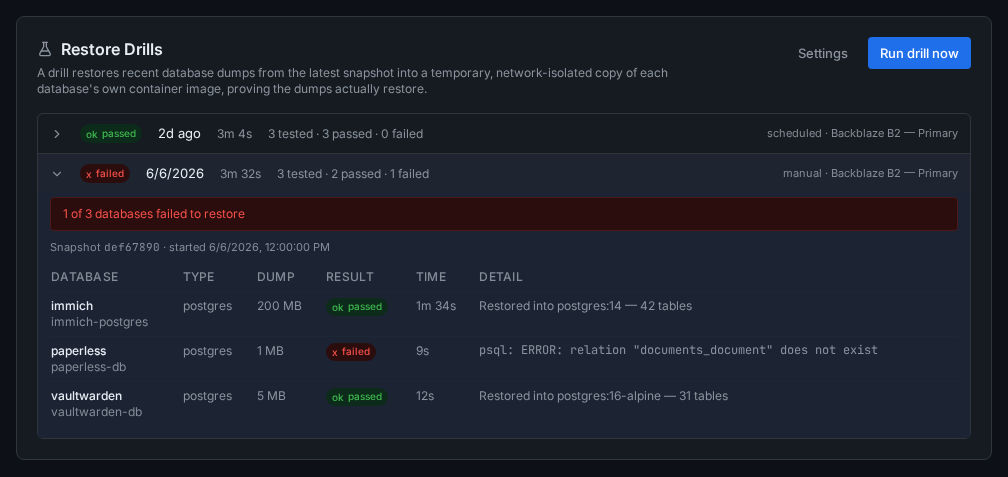
- passed: the dump restored and the check succeeded, for example "12 tables restored".
- failed: the dump did not restore. Examples: the dump is truncated, the load returned an error, fewer tables came back than the dump declares, or a dump listed in the manifest is missing from the snapshot.
- skipped: the dump wasn't tested. This happens for types drills don't cover (MongoDB, Redis, and the PostgreSQL roles dump), for dumps over the size limit, and when the test database couldn't be started (for example an image that needs extra settings to start). A skip is not a failure.
The drill as a whole is failed if any database failed, passed if at least one passed and none failed, and skipped if nothing could be tested.
- A failed drill sends a Restore drill failed (
drill.failed) notification listing the databases, and marks the dashboard as degraded. - Three drills in a row that test nothing also send
drill.failed, titled "Restore Drills Not Testing Anything", because restores are then unproven. - The next drill re-tests a database that failed before anything else.
- Each database's last drill result also appears on the Databases page (see Database health).
- A passed drill completes the Prove a restore works step of the setup checklist.
Disk space and resources
- Loading a dump needs free space in
/config/restoresof about twice the dump size plus 1 GB. When there isn't enough, that database is skipped. - The drill database lives under
/config/restoreson the host. If Arkive can't work out the host path of that folder, it only drills dumps under 512 MB, because they would otherwise load into Docker's own storage (docker.imgon Unraid). - A load may take up to 30 minutes (at least 5 minutes, plus a second per MB of dump). A test database gets 3 minutes to start.
- Throwaway containers are named
arkive-drill-...and carry the labelarkive.drill. If Arkive is restarted in the middle of a drill, it removes leftover containers and scratch folders at the next start.
If a drill fails
Open the drill in the Restore Drills panel and read the per-database detail:
- "dump is truncated (no completion trailer)": the dump in the snapshot was cut short. Check the database's dump history on the Backups page, and run a backup to produce a fresh dump.
- A load error: the dump doesn't load into a clean server of the same image. Read the error text. It usually names the missing extension, role or setting.
- "only N of M tables were restored": part of the dump didn't load. Treat this database's backups as unproven until a drill passes.
- A repository error (the drill fails before testing anything): the snapshot couldn't be listed or restored. Run Test on the target, and see Troubleshooting.